E-learning is a digitized version of traditional classroom education, and effective lesson design is the foundation of this process. E-learning lessons…
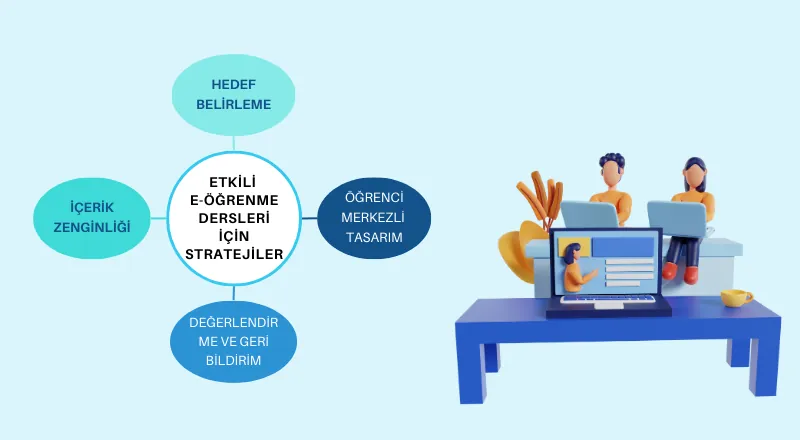
E-learning is a digitized version of traditional classroom education, and effective lesson design is the foundation of this process. To make your e-learning lessons effective, you can focus on the following strategies:
Goal Setting: Clearly define the purpose and goals of the lesson. Understanding what students need to learn is the foundation of the design process.
Content Richness: Your e-learning content should be engaging, informative, and interactive. Use different learning materials such as visuals, videos, audio, and text.
Learner-Centered Design: Take students' needs and learning styles into account. Offer a learner-centered experience with interactive learning activities and customized content.
Assessment and Feedback: Use assessment tools frequently to monitor student performance and provide students with regular feedback.
What Should You Pay Attention to When Preparing E-Learning Content?
One of the most important factors for success in learning processes, whether face-to-face or online, is content. The more engaging the educational content is, the higher the success of the education. When preparing e-learning content, it's important to approach the subject from scratch each time and to follow the steps below.
Identifying the Target Audience: The first step is determining who will use the content. Understanding students' characteristics such as age, education level, and experience level matters in designing the content. Content suited to different student groups should be created.
Defining Aims and Goals: Before preparing content, clearly define the aims and goals of the lesson. It's important to determine what students need to learn and what skills they should have by the end of the lesson. It may even be a good idea to present these to students at the start of the lesson.
Diversifying Learning Materials: Instead of using only text, use different learning materials such as visuals, videos, audio, and infographics. This supports students' different learning styles and makes the content more attractive. You can produce some of the learning materials yourself and use ready-made materials for others.
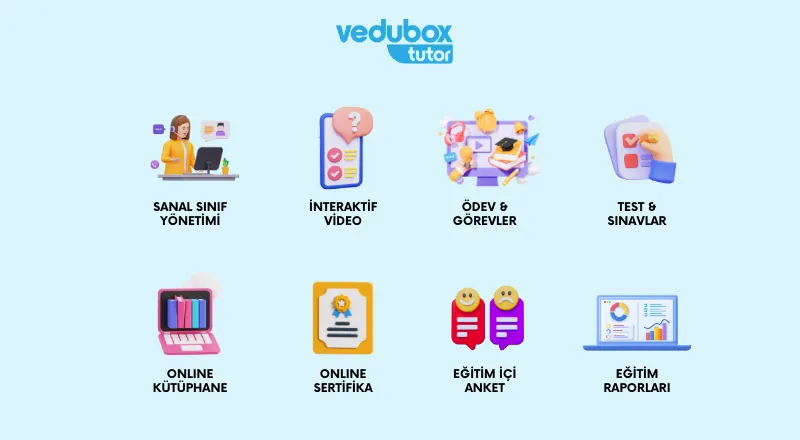
Interactive Learning Tools: Use interactive learning tools that will move students from being passive viewers to active participants. Tools such as quizzes, simulations, interactive questions, and surveys help students learn the lesson more effectively. Don't forget to look at the features of Vedubox Tutor, which offers all of these tools on a single platform.
Student Feedback: Provide students with regular feedback. Feedback channels such as quiz results, homework, discussion forums, and responses to student questions help you track students' development.
Customization Options: Offer options to customize your e-learning content according to students' needs and learning styles. This allows students to learn more effectively and access content that better matches their interests.
Time Management: Lesson content should be designed so that students can manage their time efficiently. Lesson durations, modules, and tasks should be planned so they can be completed on time.
Language Use: Make it easier for students to understand the topic by explaining complex terms in simple language. Language use should be clear, understandable, and consistent.
Assessment and Monitoring: Monitor students' progress and success regularly. Using assessment tools and criteria that evaluate student performance, update and improve the content when needed.
What Should You Pay Attention to When Choosing E-Learning Software?
You should consider the following factors when choosing e-learning software. You can try Vedubox Tutor, which brings together all the important features listed below on a single platform, free for 14 days (no credit card required).
User-Friendliness: It's important for the software to have a user-friendly interface. An interface that both students and tutors can use easily increases efficiency.
Customization Options: Customizable software lets you personalize the lesson content and experience. Customization helps create content that adapts better to students.
Data Analytics: Data analytics features help you monitor student performance and improve the content. This data helps you understand where students struggle or which topics they understand better.
Mobile Support: Students are likely to access from different devices. Therefore, it's important that e-learning software works smoothly on mobile devices.
Content Management: You should choose software that offers an easy content management system for creating, editing, and distributing content. You should be able to update your content easily.
Communication Tools: E-learning software needs to include tools that ease communication with students and tutors. Communication tools such as live chat, forums, and email integration can increase student interaction.
Troubleshooting Support: It's important that the software offers technical support and troubleshooting services. You should be able to get support quickly when there's any problem or question.
Security: E-learning platforms must ensure the security of student data. Security measures such as data encryption, strong authentication, and security backups are important.
Integration Options: E-learning software being integrable with other systems eases data flow and improves user experience. For example, integration with student management systems or video conferencing tools is important.
What Are Online Teaching Tools?
Online teaching tools are important elements you can use to support your education process. Let's talk about Vedubox Tutor and other popular tools:
Vedubox Tutor: A powerful tool you can use to manage your live lessons. You can interact with students, share content, and track student progress. Learn more about Vedubox Tutor.
Vyond: A platform that helps you create animated videos. You can use it to make your lessons more attractive. Learn more about Vyond.
Articulate: Software used to create educational content. It lets you prepare interactive presentations and learning modules. Learn more about Articulate.
Powtoon: A platform that helps you create engaging animated videos. You can use it especially to simplify complex topics and present them to students in a fun way. Learn more about Powtoon.
Camtasia: Software you can use for screen recording and video editing. You can record, edit, and present your lessons to students. Learn more about Camtasia.
In our article we covered how to design an effective lesson in e-learning. Get in touch right away to learn about ETGİ Grup's homegrown product Vedubox Tutor and the content development tools it is a reseller of.
Author :
Vedubox Tutor
Category :
Content Creation
Date :
September 6, 2023
Length :
5 min read
Share :
Related Articles
Related content, tips, and updates to deepen your understanding and help you discover new ideas